6 câu hỏi
Bước 1. Tạo tệp “Bài 10-NV1.css”
Mở phần mềm Sublime Text.
Tạo tệp mới và ghi lưu với tên Bài10-NV1.css.
Bước 2. Khai báo các quy tắc định dạng CSS như sau:
.blue {coler: steelblue;}
.red {coler: darkred;}
.orangered {font-family: “verdana”; -webkit-tap-highlight-color: transparent; margin: 0px; padding: 0px; user-select: text; background-repeat: repeat-x; background-position: left bottom; background-image: var(--urlSpellingErrorV2, ); border-bottom: 1px solid transparent;">orangered:}
input.yellow {background-color: yellow; } input.blue {background-color: blue; color: white;}
P{margin: 30px;}
p.custom-boder {padding: 20px; boder-style:solid;}
Bước 3. Ghi lưu tệp.
Code như sau:
<!DOCTYPE html>
<html> <head>
<title>Xác định vị trí tuyệt đối</title> <meta charset="utf-8">
<style>
region {padding: 20px; border-style: solid;}
.header {background-color: Lightcyan;}
navigation_menu{background-color: Lightgray; height: 50px;} .content {background-color: Lightsalmon; height: 300px;} .footer {background-color: Lightgray;}
</style>
</head>
<body>
<div class="header region">Phần đầu trang</div>
<div class="navigation_menu region">Thanh điều hướng</div> <div class="content region">Phần nội dung</div> <div class="footer region">Phần chân trang</div>
</body>
</html>
Kết quả:

Cần thiết lập hiển thị theo dòng hoặc theo khối để tạo trang web như ở Hình 7, mỗi phát biểu dưới đây là dúng hay sai?
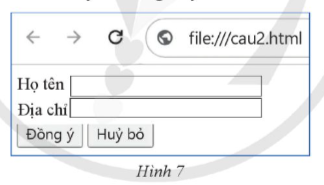
a) Theo mặc định, các phần tử input được hiển thị theo khối nên khi khai báo các phần tử input trong văn bản HTML không cần xác định thuộc tính display mà các điều khiển trên biểu mẫu vẫn hiển thị đúng như yêu cầu.
b) Để hiển thị như yêu cầu cần định dạng các label được hiển thị theo khối bằng khai báo định dạng label {display: block}. Phần body của văn bản HTML
khai báo như sau:
<body> <form>
<lable>Họ tên<input type=”text name=”txten”></lable>
<lable>Địa chỉ<input type=”text name=”txDiachi”></lable>
<input type=”sumbmit” name = cmd value =”đồng ý”>
<input type=”sumbmit” name = cmd value =”huỷ bỏ”>
</body> </form>
c) Để hiển thị như yêu cầu cần định dạng các label được hiển thị theo khối bằng khai báo label {display: block}. Phần body của văn bản HTML khai báo như sau:
<body> <form>
<label>Họ tên</label><input type="text" name="txtTen">
<label>Ɖia chi<label><input type="text" name="txtDiachi"> <input type="submit" name="cmd" value="Đồng ý">
<input type="submit" name="cmd" value="Huy bo"> </form></body>
d) Theo mặc định, các phần tử input được hiển thị theo dòng nên cần khai báo định dạng hiển thị theo khối cho hai ô text nhập dữ liệu .bl {display: block}. Phần body của văn bản HTML khai báo như sau:
<body> <form>
<label>11o tên<input class="bl" type="text" name="txtTen"></label>
<label>Dia chi<input class="bl" type="text" name="txtDiachi"></label>
<input type="submit" name "cmd" value "Dong y">
<input type="submit" name="cmd" value-"Huỷ bo">
</form> </body>
a) Sai
b) Sai
c) Sai
d) Đúng
Bạn có thích hoạt động này không?
Ý kiến của bạn sẽ giúp chúng tôi đề xuất nội dung phù hợp hơn.
![[Năm 2022] Đề thi thử môn Vật lí THPT Quốc gia có lời giải - Đề số 21](/_next/image?url=https%3A%2F%2Fvideo.vietjack.com%2Fupload%2Fimages%2Fvj-image%2Fimage-3izficdefgfoel0s9j8s-1786772791.jpg&w=3840&q=75)
![[Năm 2022] Đề thi thử môn Vật lí THPT Quốc gia có lời giải - Đề số 20](/_next/image?url=https%3A%2F%2Fvideo.vietjack.com%2Fupload%2Fimages%2Fvj-image%2Fimage-emy0gtcksawvorajezvv-1786772460.jpg&w=3840&q=75)