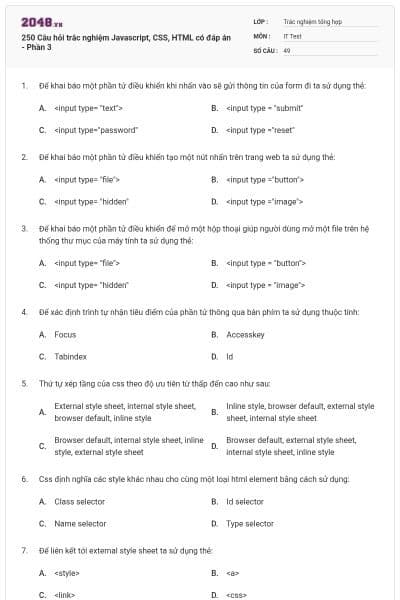
250 Câu hỏi trắc nghiệm Javascript, CSS, HTML có đáp án - Phần 3
49 câu hỏi
<input type= "text">
<input type = "submit"
<input type="password"
<input type ="reset"
Chọn đáp án B
<input type= "file">
<input type ="button">
<input type= "hidden"
<input type ="image">
Chọn đáp án B
<input type= "file">
<input type = "button">
<input type= "hidden"
<input type = "image">
Chọn đáp án A
Focus
Accesskey
Tabindex
Id
Chọn đáp án C
External style sheet, internal style sheet, browser default, inline style
Inline style, browser default, external style sheet, internal style sheet
Browser default, internal style sheet, inline style, external style sheet
Browser default, external style sheet, internal style sheet, inline style
Chọn đáp án D
Class selector
Id selector
Name selector
Type selector
Chọn đáp án A
<style>
<a>
<link>
<css>
Chọn đáp án C
Http
Fpt
Smtp
Hmpt
Chọn đáp án B
2
3
4
5
Chọn đáp án B
Code view
Design view
Combined view
Layout view
Chọn đáp án A
Code view
Design view
Combined view
Layout view
Chọn đáp án D
Code view
Design view
Combined view
Layout view
Chọn đáp án C
Code view
Design view
Combined view
Layout view
Chọn đáp án B
True
False
Chọn đáp án A
Swt
Gif
Dwt
Swf
Chọn đáp án D
Auto styles
Html style
Css style
New style
Chọn đáp án A
Root – relative
Document-relative
Absolute
Chọn đáp án C
Property inspector
Insert panel
Objects panel
Code inspector
Chọn đáp án A
Ctrl + Z
Ctrl + Y
Edit undo
Edit repeating entries
Chọn đáp án A
Css
Dwt
Html
Swf
Chọn đáp án B
Đưa con trỏ đến ô cuối cùng, sau đó nhấn phím tab
Ctrl + m
Modify insert row
Insert table
Chọn đáp án B
0,0
1,2
2,1
1,1
Chọn đáp án D
<heading>
<h1>
<h6>
<head>
Chọn đáp án B
<Ib>
<br>
<break>
<enter>
Chọn đáp án B
<body color="yellow">
<body bgcolor="yellow">
<background>yellow</background>
Chọn đáp án B
<b>
<bold>
<bld>
<bb>
Chọn đáp án A
<ii>
<italics>
<i>
<li>
Chọn đáp án C
<a url="http://www.w3schools.com">w3schools.com</a>
<a>http://www.w3schools.com</a>
<a href="http://www.w3schools.com">w3schools</a>
<a name="http://www.w3schools.com">w3schools.com</a>
Chọn đáp án C
<a href="xxx@yyy">
<a herf="mailto:xxx@yyy">
<mail>xxx@yyy</mail>
<mail href="xxx@yyy">
Chọn đáp án B
<a href="url" new>
<a href="url" target="new">
<a href= "url" target="_blank">
<a href= "url" target="blank">
Chọn đáp án C
<table><tr><td>
<thead><body><tr>
<table><head><tfoot>
<table><tr><tt>
Chọn đáp án A
<tdleft>
<td valign="left">
<td align="left">
<td leftalign>
Chọn đáp án C
<ul>
<list>
<ol>
<dl>
Chọn đáp án C
< list>
<ul>
<ol>
<dl>
Chọn đáp án B
<check>
<input type="check">
<checkbox>
<input type="checkbox">
Chọn đáp án D
<textfield>
<textinput type="text">
<input type="text">
<input type="textfield">
Chọn đáp án C
<select>
<list>
<input type="dropdown">
<input type="list">
Chọn đáp án A
<input type="textbox">
<textarea>
<input type="textarea">
Chọn đáp án B
<image src="image.gif">
<img>image.gif</img>
<img src="image.gif">
<img href="image.gif>
Chọn đáp án C
<body background="background.gif">
<background img="background.gif">
<img src="blackground.gif"background>
Chọn đáp án A
Creative style sheets
Computer style sheets
Cascading style sheets
Colorful style sheets
Chọn đáp án C
<style src="mystyle.css">
<stylesheet>mystyle.css</stylesheet>
<link rel="stylesheet"type="text/css"href"=mystyle.css">
Tất cả các câu trên đều sai.
Chọn đáp án C
In the <body> section
In the <head> section
At the top of the document
At the end of the document
Chọn đáp án B
<css>
<script>
<style>
Tất cả các câu trên đều sai
Chọn đáp án C
Font
Class
Style
Styles
Chọn đáp án C
Body {color: black}
{body;color:black}
Body:color=black
{body:color=black(body}
Chọn đáp án A
/* this is a comment */
// this is a comment //
‘ this is a comment
// this is a comment
Chọn đáp án A
Color:
Bgcolor:
Background-color:
Tất cả các câu trên đều sai.
Chọn đáp án C
Làm thế nào thêm màu nền cho tất cả các phần tử <h1> ?
H1.all {background-color:#ffffff}
H1 {background-color:#ffffff}
All.h1 {background-color:#ffffff}
Tất cả các câu trên đều sai.
Chọn đáp án B